Teaching for Impact: Designing Effective & Open Training
Part 2: Open Educational Resources (OERs)
Developed for the Failure Modes of Engineering (FeME) Project

Today's agenda
| Part 1 recap & reflection |
| Designing for openness |
| Exercise 1: What do materials expect? |
| Exercise 2: Evaluate a resource |
| Exercise 3: What are you allowed to do? |
| Break (20 min) |
| Exercise 4: What needs to change? |
| Exercise 5: Create a usable component |
| Exercise 6: Make it easier to use |
| Closing reflection |
Before we start
We are not lawyers!
- This is a working session — you'll be making decisions about your own materials
- You'll work individually, in small groups, and in the main room
- Keep your own notes — each exercise builds on the last
- 20-minute break at the halfway point
Please
- Keep your cameras on
- Use the chat freely — many exercises start there
How the workbook works
Reconnecting to Part 1
Yesterday, you designed for change.
Today, you're deciding what learning materials/resources support that change.
Today's arc
You'll work through a decision workflow:
- What do your materials assume?
- What exists and does it fit?
- What are you allowed to do with it?
- What needs to change?
- What do you need to create?
- How do you make it usable for others?
What resonated with you?
In the chat:
Which part of yesterday's session did you find most useful? Why?
What are you unsure about?
In the chat:
What is one thing that is still unclear?
If you have any questions, feel free to raise your hand
Questions on Theory of change
Henry had a question yesterday about linking outcomes to impact. Let's talk through it.
- Impact — broader change
- Outcomes — what changes in learners' behaviour or practice after the training.
- Outputs — what learners produce or complete during the training
- Activities — what learners do during training
- Inputs — what you invest
Homework: You were asked to find one learning resource related to your training
In the chat:
What learning outcome does that resource relate to?
What are you trying to help people do?
If you didn't manage to find a resource, just pick an outcome you would like to focus on. Do a quick Google search right now.
Everything today should connect back to this outcome + resource.
Learning outcomes revision (if needed)
- Is it observable?
- Is there a clear action that learners can take?
- Is it specific? Or vague?
- Are you clumping too many learning outcomes together?
- Is it realistic for your learners?
Introduction to OERs
- OER == Open Educational Resource
- You can use existing materials to make your own training better, or to save time
- You can grow your impact by opening your own content up for re-use
- Example: All the materials for this course (the workbook and presentations)
Designing for openness
An open resource allows you to:
- Retain — keep a copy
- Reuse — use it in your teaching
- Revise — modify or adapt it
- Remix — combine it with other materials
- Redistribute — share it with others
These are the 5 Rs of open educational resources.
You're not starting from scratch
Designing for openness is not just about creating new materials.
It's about working with what already exists — reusing, adapting, and localising it for your context.
Three questions
Your Part 1 learning outcome determines:
- What kind of resource should I look for?
- What can I reuse?
- What needs to change?
- What do I need to create?
Exercise 1: What do materials expect?
Individual → whole group
Consider the following instruction:
"Download the dataset and analyse it in Excel."
What does this expect someone to already know, have, or be able to do?
What questions might learners have when you give them this instruction?
Exercise 1: A quick scan
5 min · Work with the activity you created yesterday or any activity or lesson content that you want to evaluate.
Respond in chat or your own notes:
- What would someone need to know?
- What would they need to have access to?
- What might confuse or block them?
- How can you adapt to those assumptions/risks? Do you need to?
This is a quick scan. We're not doing a thorough analysis right now.
Exercise 1: Debrief
What patterns do you see?
- Prior knowledge — what learners need to already know
- Tools and access — what they need to have
- Context — time, language, environment
These are the assumptions sitting between your activity and your outcome.
All learning resources make assumptions!
From assumptions to evaluation
You've looked at what materials expect from learners.
Now: what exists, and does it fit your context?
Finding and evaluating OER
You are not looking for the "best" resource.
You are looking for something that works for your learners, in your context.
Three quick checks
When you look at a resource, ask:
- Alignment/Fit:Does this help learners achieve the intended outcome?
- Context/Dependencies:What assumptions does this resource make?
- Effort/Decision:What would it take to reuse this: use as-is, adapt, or rebuild?
Most resources will not fit perfectly — and that's expected.
Exercise 2: Evaluate a resource
8-10 min. Individual work
Evaluate a learning resource
Using your learning outcome from Part 1, make a quick judgement:
- Does this help learners achieve the intended outcome?
- What assumptions does this resource make?
- What would it take to reuse this: use as-is, adapt, or rebuild?
This exercise is helps you get started. Don't overthink this.
If useful, glance at a second resource: which fits better for your context, and why?
Exercise 2: Debrief
What patterns did you notice?
- What tends to fit?
- What tends to break?
- Where do assumptions mismatch?
Most resources don't fit perfectly — and that's expected.
Poll: Let's see what restrictions was found?
Complete the Zoom poll
Select the restriction that you first identified or the one that was most important to you.
There may often be more than one reason why a resource is not usable. This is not an exhaustive list.
From fit to permission
Sometimes the constraint is not fit —
it's what you are allowed to do with a resource.
Understanding open licenses
You may find something that fits your learners well —
but you still need to check what you're allowed to do with it.
We aren't lawyers!
- You need to take this stuff seriously
- But try not to feel intimidated
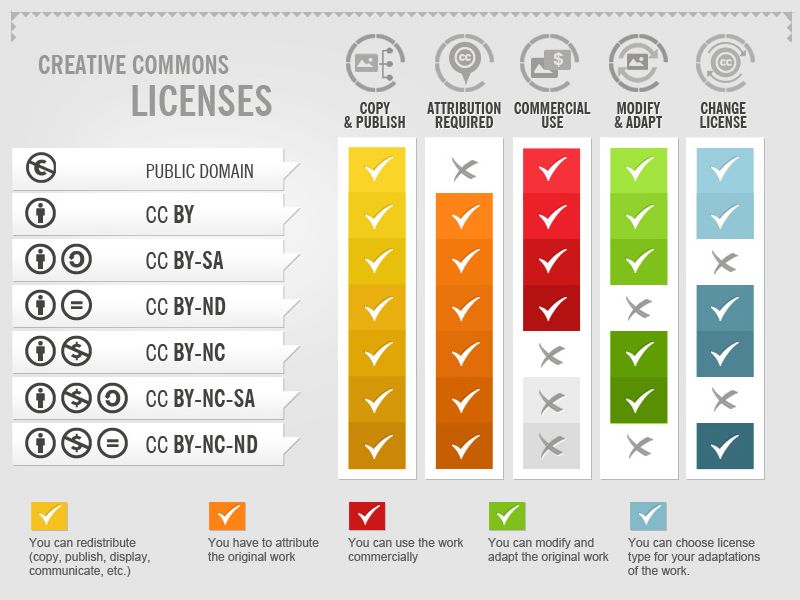
The licensing spectrum
What you need to know
- No license → you cannot reuse or adapt - you may link to it though
- CC BY → reuse and adapt, with attribution (who is the original work BY)
- CC BY-ND → reuse only — no changes allowed (No Derivatives)
Attribution = clearly indicating where you got the original content and who developed it
You don't need to memorise licenses.
You need to recognise when something limits what you can do.
Exercise 3: What are you allowed to do?
6-8 min . Individual work
Return to the resource you evaluated. Identify:
- What license does it use? (if any)
- What does this allow you to do?
- Can you reuse it as is?
- Can you adapt or change it?
- Does the license limit what you need to do?
If the license is unclear: what risk does that create for you?
Exercise 3: Debrief
What did you find?
- Missing or unclear licenses
- Restrictions on adaptation
- Uncertainty about what is allowed
You've now looked at what fits, what doesn't, and what you are allowed to use or change.
Break
Back at [TIME]
20 minutes
Welcome back
So far, we've analysed:
- What materials assume
- What fits
- What you are allowed to do
From analysis to action
Now we shift:
What changes would you make to align the existing resource with your needs?
Take 2-3 minutes to think silently.
Look at the resource you have evaluated earlier or choose a new one.
Adapting, remixing, and localising
You've found something that might work.
You've checked what you're allowed to do.
Now: how do you make it actually work for your learners?
Sometimes this means combining sources (remixing), or changing language and context (localising and translating).
Three types of change
- Surface — small edits (wording, translation, examples, formatting)
- Structural — changing how something is organised or combining parts from multiple sources (remixing)
- Contextual — changing assumptions (tools, learners, environment, local context)
Most useful adaptation happens when you change how something works — not just how it looks.
Exercise 4: What needs to change?
10-12 min . Individual work
For your selected resource, identify:
- What would you keep?
- What would you change?
- What would you remove or replace?
- Would you combine this with another resource (remix)?
- What needs to be localised or translated for your learners?
Don't try to redesign everything — focus on the changes that would make this usable in your context.
Think back to the work you did yesterday on your Theory of Change. What assumptions should you keep in mind?
Exercise 4: Small groups
10-12 min · Groups of 2-3
Share your resource and your proposed changes.
Ask each other:
- What are they missing?
- Where would remixing make this stronger or simpler?
- What would break if this is not localised?
Keep feedback direct and practical.
Exercise 4: Debrief
What patterns emerged?
- Surface changes are common but often insufficient
- Localisation is often underestimated but critical for usability
- Remixing increases value but also complexity
- Structural and contextual changes are where impact happens
Adaptation is about making something work in your context — not making it better.
When adaptation isn't enough
If those changes start to feel like rewriting everything,
creating something new may be simpler.
Creating OER from scratch
Creation makes sense when:
- Nothing fits your learners or outcome
- Adaptation becomes too complex
- Licensing prevents the changes you need
What does a useful resource enable?
It starts with you — and extends outward
Hint: Think back to your systems mapping, Theory of Change and learner constraints

Exercise 5: Create a usable component (Team work)
20 min
Create one small component. For example:
- A short activity with clear instructions
- A worked example (step-by-step demonstration of a task)
- A task or exercise prompt that learners can complete independently
- A guide or checklist (e.g. steps in a process)
- A localised example or case adapted to your context
Someone else should be able to use this without asking you for clarification.
Exercise 5: Debrief
- What made something usable?
- What made something unclear?
A useful resource stays clear when you are not right there to guide every step. How can this be improved?
From creating to sharing
You've created something someone else could pick up and try.
Now: can someone else find it, understand it, and use it?
Sharing and publishing OER
You already have something usable.
To share it, you only need a few small additions:
- A title — what is this?
- Authors — who created it?
- A short description — what does it help someone do?
- Context — who is it for and how should it be used?
- A license — what are others allowed to do with it?
It is good practice to include funder informtion if the project received specific funding
This does not need to be perfect.
It just needs to be clear enough to find, understand, and reuse.
Exercise 6: Make it shareable
13 min · Team work → chat → whole group
You've created something usable.
Now: how would you share it so others can find and use it?
Exercise 6: Team work
6-7 min
Take your component and make it ready to share by adding:
- A title — what is this?
- Autors — who created it?
- A short description — what does it help someone do?
- Basic context — who is it for and how should it be used?
- A license — what are others allowed to do with it?
Use the Creative Commons license chooser to select a license:
Keep it simple — this should take a few minutes, not perfection.
Exercise 6: Share in chat
3–4 min
Share:
- Your title
- Your license
Sustaining and improving OER
Once you've created something, it becomes something you can revisit, reuse, and improve.
You will notice what works, what needs to change, and where gaps appear.
Others may also adapt it and build on it in different contexts.
The OER lifecycle
A resource becomes more useful over time if it is used, tested, and improved.
Closing reflection
You've now worked through the full process:
finding → evaluating → adapting → creating → sharing
One thing you'll do differently
In the chat:
What is one thing you will do differently when working with materials?
What you've connected
- Your system (Part 1)
- Your outcomes (Part 1)
- Your people (Part 1)
- Your materials (Part 2)
You don't need to do everything at once —
but you now have a way to move from idea to impact.
Keep going
The full workbook covers everything from today in more depth — plus activities you can work through at your own pace.
Use it to refine your materials, revisit your decisions, and continue the work you started here.
What's next?
We'll run a few discussion sessions. You can tell us what you would like to discuss here:
https://app.sli.do/event/ePt6dwVzUWdoxeSUVXfd3h